The proven product page structure used by top skincare brands like SkinCeuticals and The Ordinary. This template breaks down every essential section with ready-to-use prompts you can fill out and paste directly into Replo AI. No guesswork, just copy the worksheets and generate each section.
Skincare customers spend 3-4 minutes researching ingredients, checking conflicts, and reading reviews before buying. A generic product page doesn't work—you need education, transparency, and trust-building.
This page type is best for:
Premium skincare ($30-150+)
Science-backed or clinical brands
Products with active ingredients (retinol, acids, peptides, vitamin C)
New brands building credibility
Educated skincare enthusiasts
Skincare-specific considerations for PDPs:
Longer consideration - 3-7 days vs. impulse buys
Ingredient scrutiny - Customers research every ingredient
Routine anxiety - "Where does this fit in my routine?"
Safety concerns - "Will this irritate my skin?"
Price justification - Why $80 vs. The Ordinary's $7?
Ready to build? Use the sections below. Each includes a screenshot, checklist, and copy-paste prompt for Replo AI.
Case study bock
Section 1: Product Detail Section
Click to open the Figma file
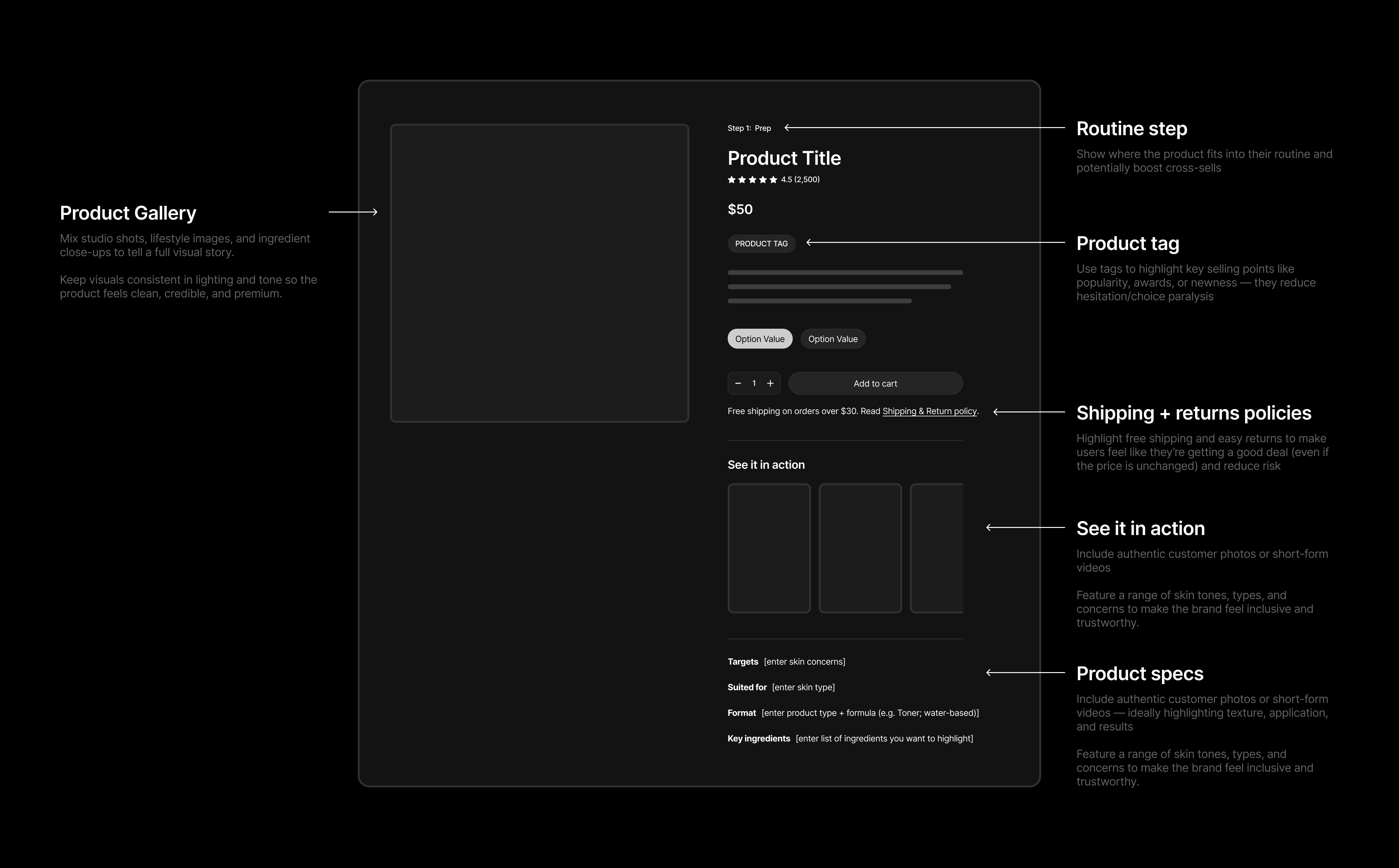
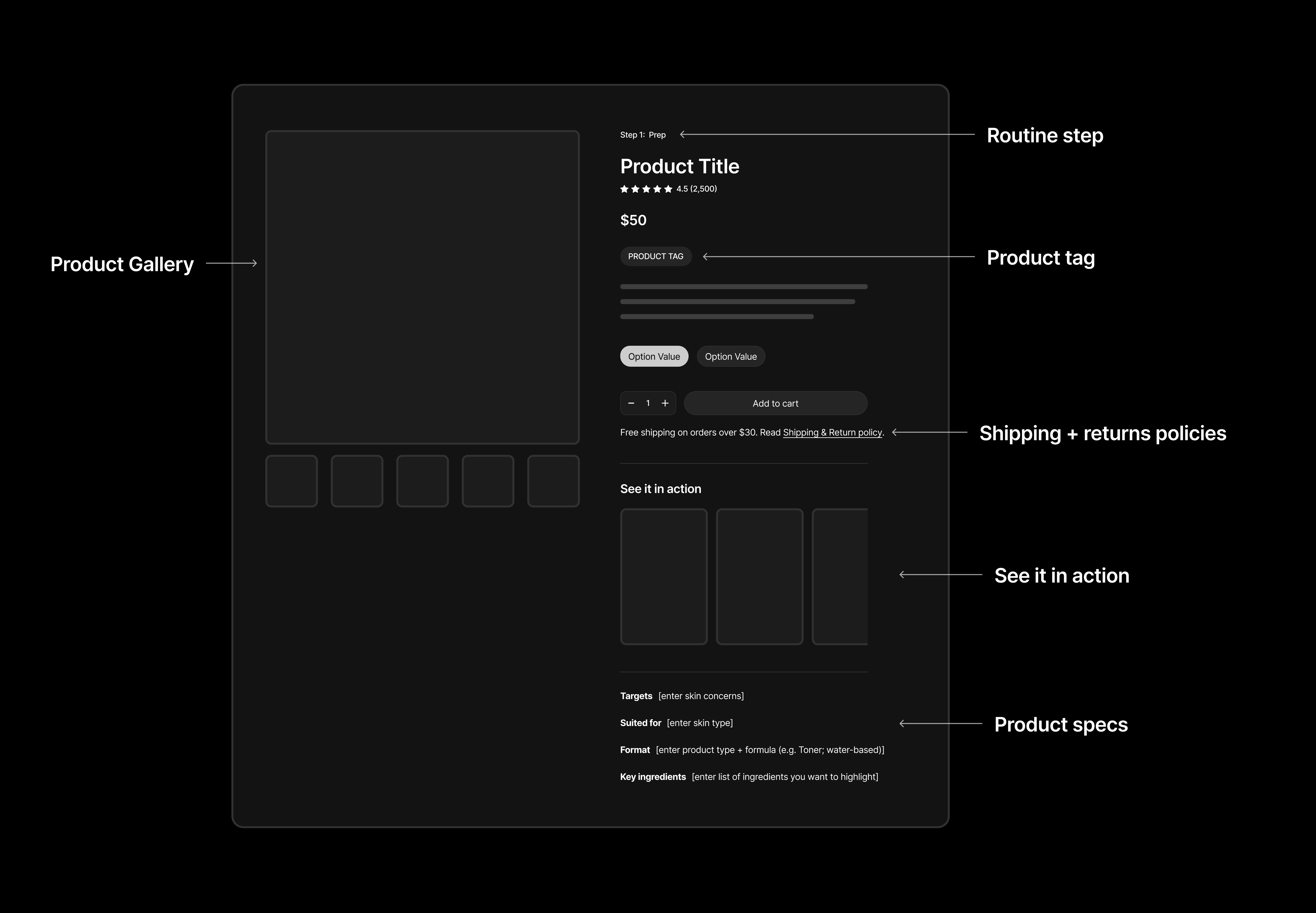
Product gallery: Mix studio shots, lifestyle images, and ingredient close-ups to tell a full visual story. Keep visuals consistent in lighting and tone so the product feels clean, credible, and premium.
Routine step: Show where the product fits into their routine and potentially boost cross-sells
Product tag: Use tags to highlight key selling points like popularity, awards, or newness — they reduce hesitation/choice paralysis
Shipping & return policies: Highlight free shipping and easy returns to make users feel like they’re getting a good deal (even if the price is unchanged) and reduce risk
See it in action: Include authentic customer photos or short-form videosFeature a range of skin tones, types, and concerns to make the brand feel inclusive and trustworthy.
Product specs:Provide quick-reference technical details that help customers determine if the product is right for their skin type, concern, and routine. This section answers "Is this for me?" at a glance.
Prompt Template
Fill in the blanks below, then copy and paste the entire prompt into Replo AI to generate this section.
Generate a hero product section for a skincare PDP.

━━━━━━━━━━━━━━━━━━━━━━━━━━━━━━━━━━━━━━━━━━━━━━
FILL IN YOUR DETAILS:
━━━━━━━━━━━━━━━━━━━━━━━━━━━━━━━━━━━━━━━━━━━━━━

Product name (reference directly in chat by typing '@': ________________________________________

Routine step: ________________________________________
(Example: "Step 1: Prep")

Product tag: ________________________________________
(Example: "Bestseller" or "Award Winner" or leave blank)

Star rating + count: ________ stars, ________ reviews

Targets: ________________________________________
(Example: "Textural irregularities, dullness, uneven skin tone")

Suited to: ________________________________________
(Example: "All skin types")

Format: ________________________________________
(Example: "Toner: Water-based")

Key ingredients: ________________________________________
(Example: "Glycolic Acid, Aloe Barbadensis Leaf Water, Panax Ginseng Root Extract")


━━━━━━━━━━━━━━━━━━━━━━━━━━━━━━━━━━━━━━━━━━━━━━
DESIGN INSTRUCTIONS (don't edit):
━━━━━━━━━━━━━━━━━━━━━━━━━━━━━━━━━━━━━━━━━━━━━━

Create a product detail section in my brand styles that includes:
- Product gallery on left (vertical thumbnails)
- Product details on right
Within product details, include:
- Routine step label at top
- Product title with ingredient percentage
- Star rating + review count
- Badge if provided
- Short description
- Size selector toggles
- Quantity picker + "Add to Cart" button
- Shipping and returns info
- "See It In Action" UGC carousel
- Product specs at bottom (Targets, Suited to, Format, Key ingredients)
Section 2: Benefits Section
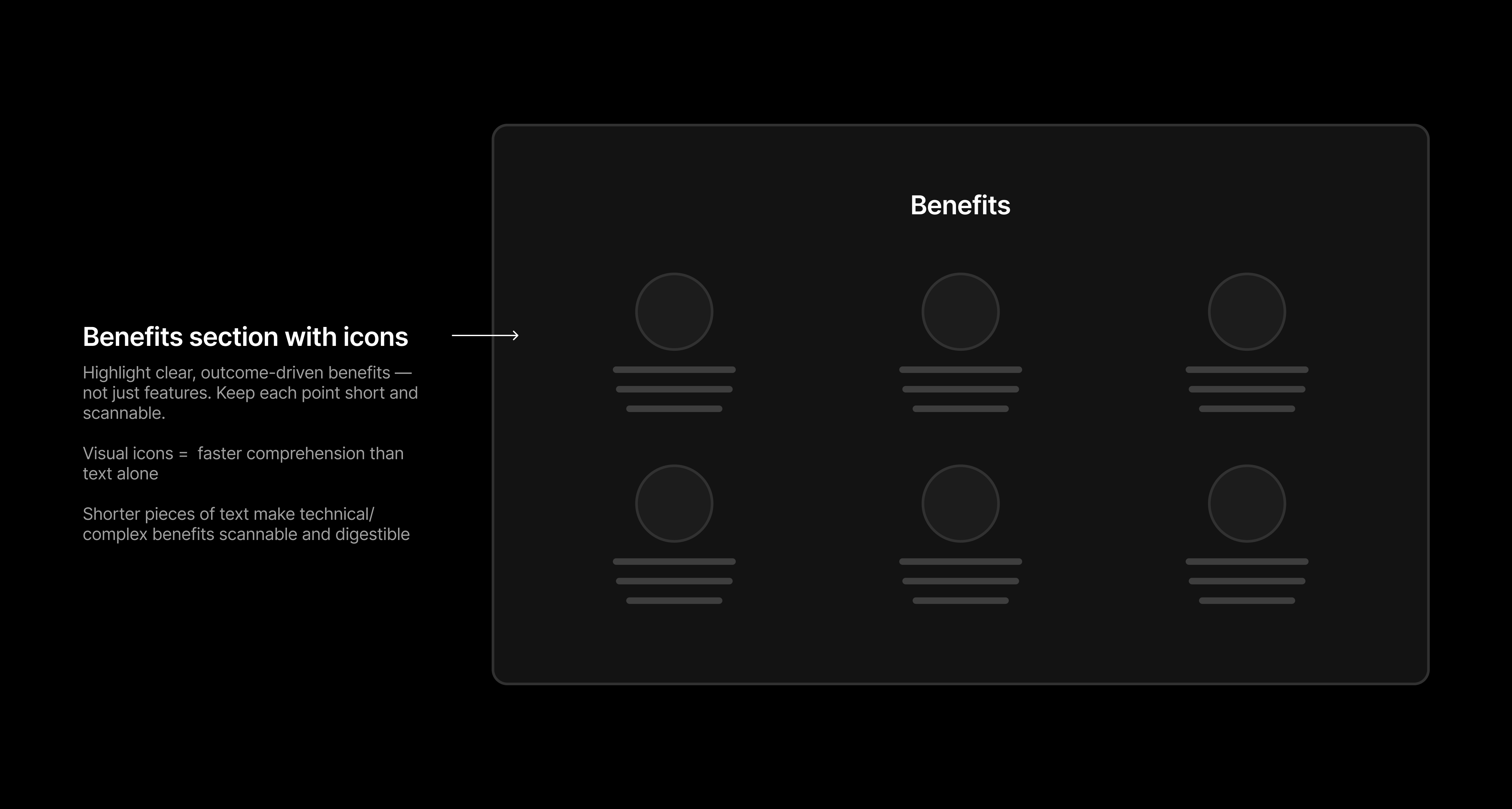
Benefits section with icons: Highlight clear, outcome-driven benefits — not just features. Keep each point short and scannable.Visual icons = faster comprehension than text aloneShorter pieces of text make technical/complex benefits scannable and digestible
Prompt Template
Fill in the blanks below, then copy and paste the entire prompt into Replo AI to generate this section.
Generate a benefits section for @[product name].
━━━━━━━━━━━━━━━━━━━━━━━━━━━━━━━━━━━━━━━━━━━━━━
FILL IN YOUR DETAILS:
━━━━━━━━━━━━━━━━━━━━━━━━━━━━━━━━━━━━━━━━━━━━━━
Choose 3-6 benefits to highlight:

BENEFIT 1:
Icon URL:
Headline: ________________________________________
(Example: "Advanced Environmental Protection")
Description: ________________________________________
(Example: "Neutralizes free radicals in the skin's upper layers to help prevent the impact of ozone damage")

BENEFIT 2:
Icon URL:
Headline: ________________________________________
Description: ________________________________________

BENEFIT 3:
Icon URL:
Headline: ________________________________________
Description: ________________________________________

BENEFIT 4 (optional):
Icon URL:
Headline: ________________________________________
Description: ________________________________________

BENEFIT 5 (optional):
Icon URL:
Headline: ________________________________________
Description: ________________________________________

BENEFIT 6 (optional):
Icon URL:
Headline: ________________________________________
Description: ________________________________________

━━━━━━━━━━━━━━━━━━━━━━━━━━━━━━━━━━━━━━━━━━━━━━
DESIGN INSTRUCTIONS (don't edit):
━━━━━━━━━━━━━━━━━━━━━━━━━━━━━━━━━━━━━━━━━━━━━━
Create a benefits section in my brand styles that includes:
- Section headline: "Benefits of [Product Name]"
- Grid layout displaying all benefits (2 rows of 3, or adjust based on number provided)
- Each benefit card includes:
  - Icon
  - Headline in bold
  - 1-2 sentence description
- Keep layout clean and scannable
- Use outcome-driven language (what the customer gets), not feature lists
- Icons should be simple, consistent style, and help with quick visual comprehension

Place this right below the Product Detail Section.
Section 3: CTA/Navigation Section
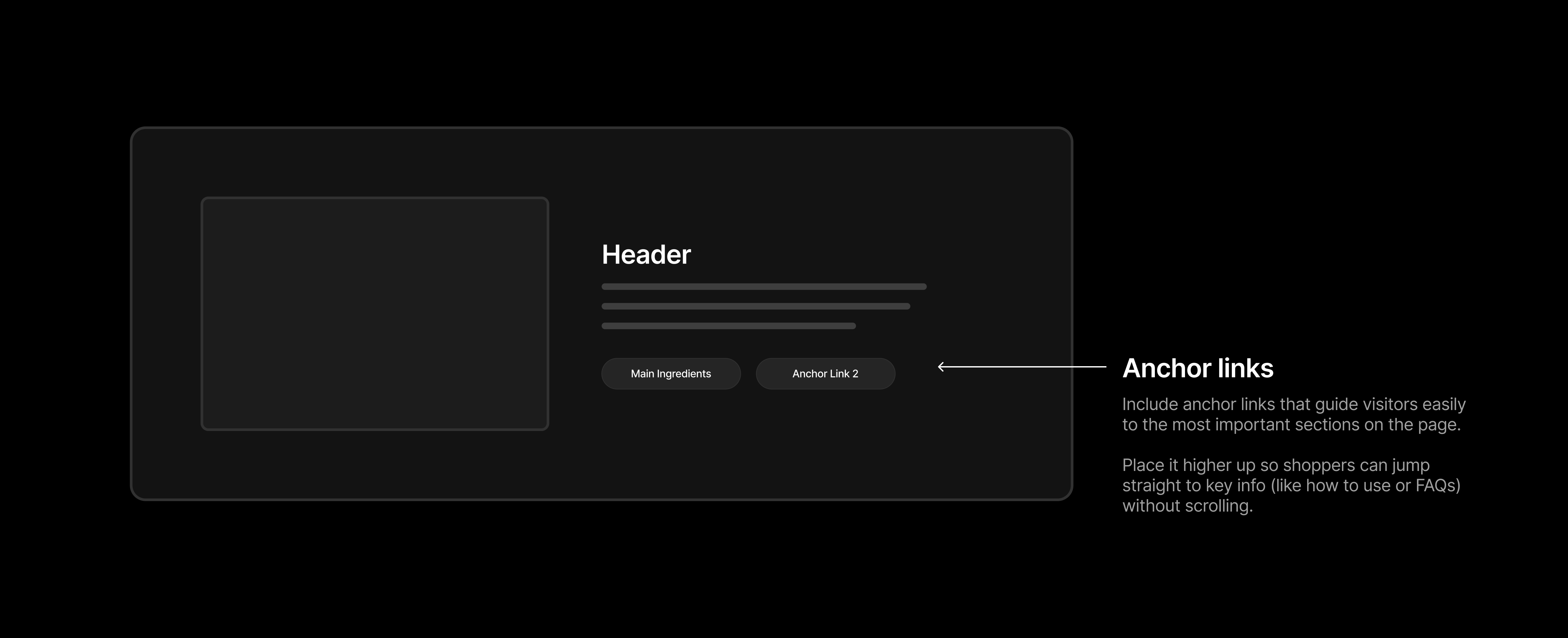
Anchor links: Include anchor links that guide visitors easily to the most important sections on the page. Place it higher up so shoppers can jump straight to key info (like how to use or FAQs) without scrolling.
Prompt Template
Fill in the blanks below, then copy and paste the entire prompt into Replo AI to generate this section.
Generate a CTA section for @[product name].

━━━━━━━━━━━━━━━━━━━━━━━━━━━━━━━━━━━━━━━━━━━━━━
FILL IN YOUR DETAILS:
━━━━━━━━━━━━━━━━━━━━━━━━━━━━━━━━━━━━━━━━━━━━━━

Hero image URL: ________________________________________
(Upload a dramatic product image - dramatic angle, shows packaging/texture/premium quality)

Section headline: ________________________________________
(Example: "Details of [Product Name]" or "Everything You Need to Know")

Short description (2-3 sentences): ________________________________________
(Example: "A daytime serum with patented vitamin C that offers advanced environmental protection and improves the appearance of fine lines, wrinkles, loss of firmness and uneven skin tone. Clinically proven to reduce combined oxidative damage from free radicals generated by UV, ozone and diesel exhaust by up to 41%. U.S. Patent No. 7,179,841.")

CTA Button 1 text: ________________________________________
Links to section: ________________________________________
(Example: "HOW TO USE" → links to usage instructions section)

CTA Button 2 text: ________________________________________
Links to section: ________________________________________
(Example: "FREQUENTLY ASKED QUESTIONS" or "FAQs" → links to FAQ section)

━━━━━━━━━━━━━━━━━━━━━━━━━━━━━━━━━━━━━━━━━━━━━━
DESIGN INSTRUCTIONS (don't edit):
━━━━━━━━━━━━━━━━━━━━━━━━━━━━━━━━━━━━━━━━━━━━━━

Create a CTA section in my brand styles that includes:
- Two-column layout: Dramatic product image on left, content on right
- Section headline at top
- Short descriptive paragraph (2-3 sentences) reinforcing key selling points
- Two CTA buttons displayed horizontally
- Buttons use anchor links to jump to specific sections below
- Clean spacing between elements
- Dark or contrasting background to create visual break from sections above/below

Place this right below the Benefits Section.
Section 4: Before & After Section
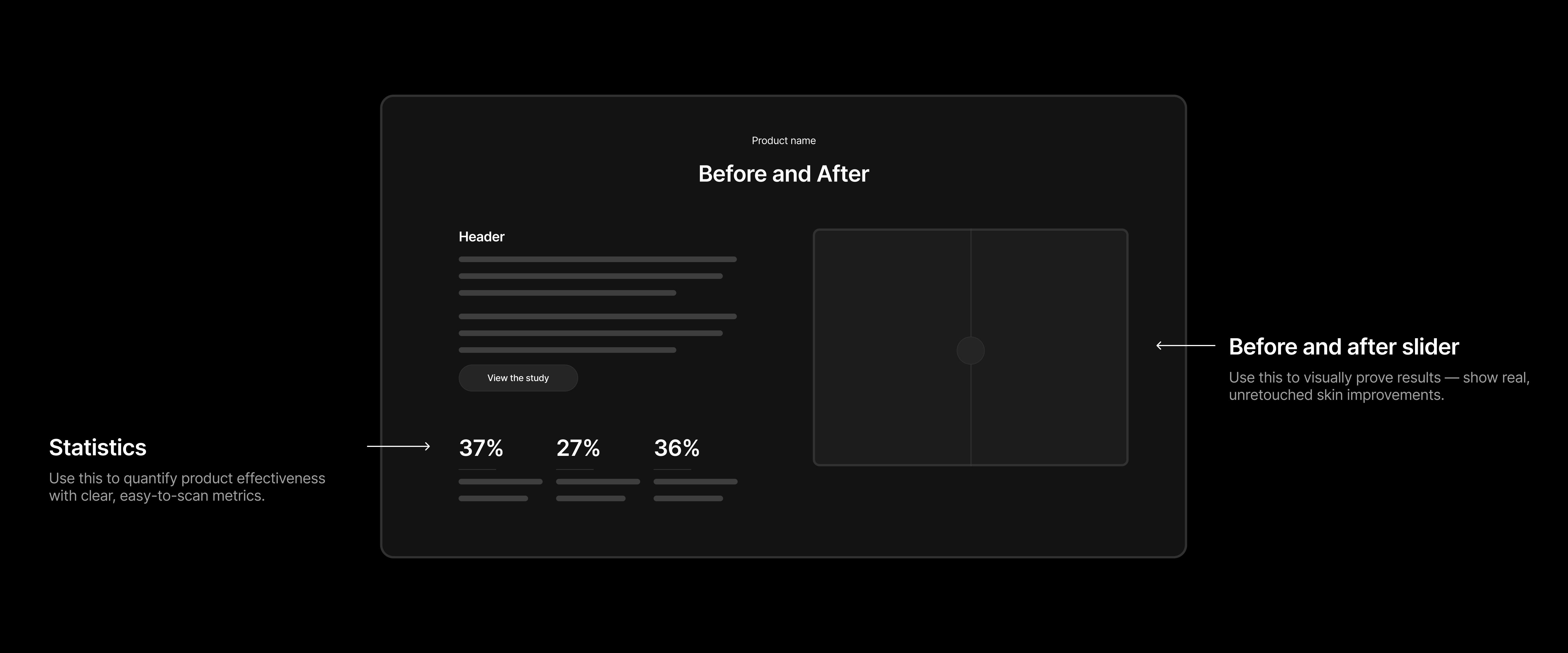
Statistics: Use this to quantify product effectiveness with clear, easy-to-scan metrics.
Before and after slider: Use this to visually prove results — show real, unretouched skin improvements.
Prompt Template
Fill in the blanks below, then copy and paste the entire prompt into Replo AI to generate this section.
Generate a Clinical Proof section for @[product name].

━━━━━━━━━━━━━━━━━━━━━━━━━━━━━━━━━━━━━━━━━━━━━━
FILL IN YOUR DETAILS:
━━━━━━━━━━━━━━━━━━━━━━━━━━━━━━━━━━━━━━━━━━━━━━

Section headline: ________________________________________
(Example: "Visible Results" or "Clinical Results")

Description paragraph (2-3 sentences): ________________________________________
(Example: "The measure of an antioxidant isn't just environmental protection, but also visible anti-aging results. Clinical studies of C E Ferulic show a reduction in the appearance of wrinkles, improved skin firmness and more luminous skin.")

Before image URL: ________________________________________
(Upload before image - must have same lighting, angle, distance as after image)

After image URL: ________________________________________
(Upload after image - must have same lighting, angle, distance as before image)

Timeline label: ________________________________________
(Example: "Before" and "After 12 weeks" or "Average results")

CLINICAL STATISTICS (2-3 data points):

Stat 1: ________%
What it improved: ________________________________________
(Example: "Increases firmness")

Stat 2: ________%
What it improved: ________________________________________
(Example: "Reduces appearance of fine lines")

Stat 3: ________%
What it improved: ________________________________________
(Example: "Reduces appearance of wrinkles")

Study protocol link (optional): ________________________________________
(Example: "View the study" or leave blank if not available)

━━━━━━━━━━━━━━━━━━━━━━━━━━━━━━━━━━━━━━━━━━━━━━
DESIGN INSTRUCTIONS (don't edit):
━━━━━━━━━━━━━━━━━━━━━━━━━━━━━━━━━━━━━━━━━━━━━━

Create a Clinical Proof section in my brand styles that includes:
- Section headline: "Before and After" or "[Product Name] Before and After"
- Left column:
  - Subheadline
  - Description paragraph (2-3 sentences)
  - Optional link to study protocol
- Right column: Interactive before/after slider with both images
- Bottom: 3 statistics displayed as large percentages in a row
  - Each stat shows: percentage number + description of what improved
- Use clean, clinical aesthetic
- Dark or light background depending on brand
- Statistics should be prominent and easy to scan

Place this right below the CTA/Navigator Section.
Section 5: Product Science Explainer
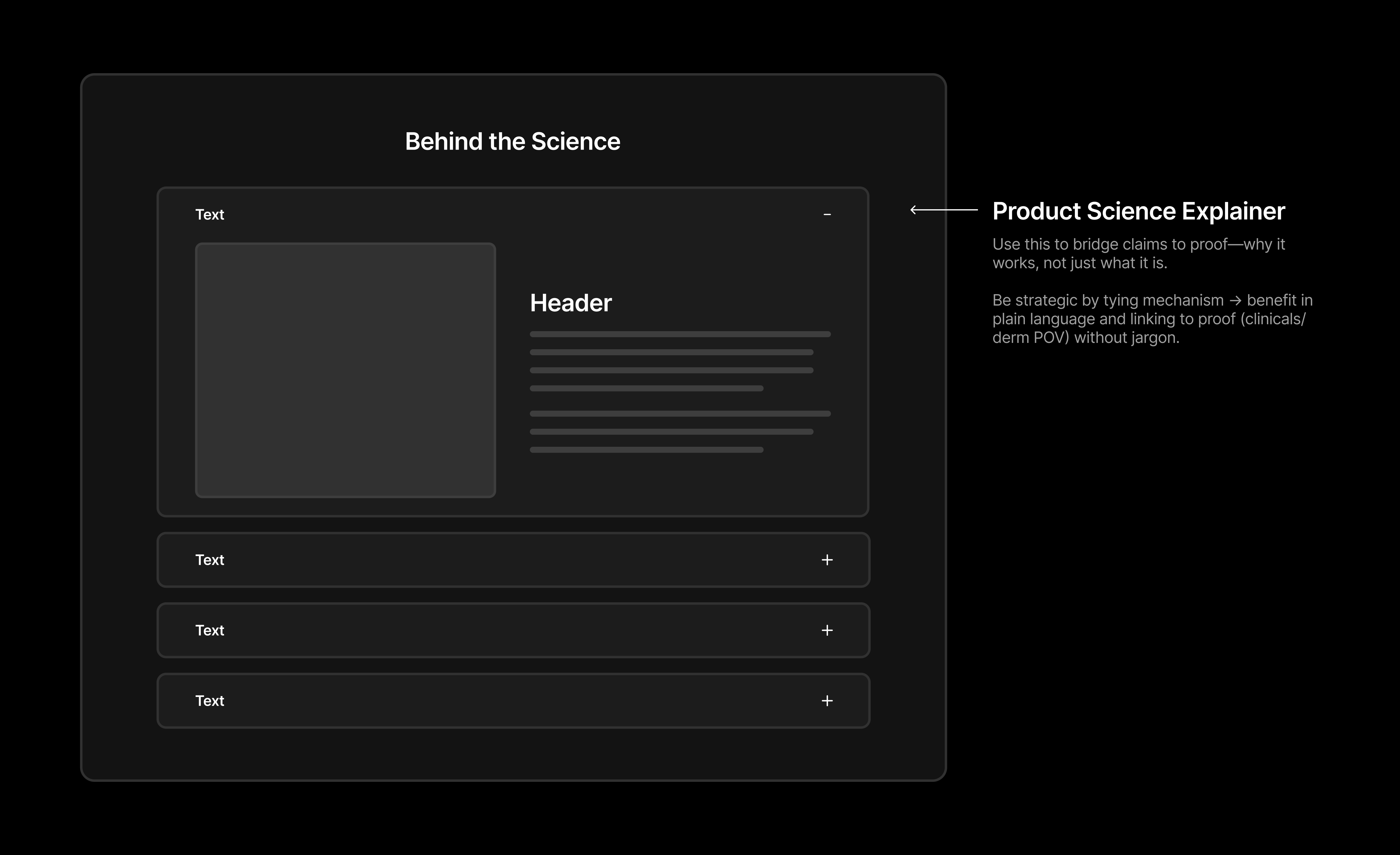
Product science explainer: Use this to bridge claims to proof—why it works, not just what it is. Be strategic by tying mechanism → benefit in plain language and linking to proof (clinicals/derm POV) without jargon.
Prompt Template
Fill in the blanks below, then copy and paste the entire prompt into Replo AI to generate this section.
Generate a Science Explainer section for @[product name].

━━━━━━━━━━━━━━━━━━━━━━━━━━━━━━━━━━━━━━━━━━━━━━
FILL IN YOUR DETAILS:
━━━━━━━━━━━━━━━━━━━━━━━━━━━━━━━━━━━━━━━━━━━━━━

Section headline: ________________________________________
(Example: "Behind the Science" or "How It Works")

ACCORDION ITEMS:
Add as many accordion items as you need to explain the science. Each accordion should explain one scientific concept or mechanism.

Accordion 1:
Title: ________________________________________
(Example: "Our Superior Formulation")
Image URL: ________________________________________
(Upload contextual image - environmental scene, lab setting, or thematic visual)
Content (2-4 sentences): ________________________________________
(Example: "Our patented formula combines 15% pure L-ascorbic acid with 1% alpha tocopherol and 0.5% ferulic acid. This specific combination and ratio neutralizes free radicals while providing enhanced stability and absorption.")

Accordion 2:
Title: ________________________________________
(Example: "Gold is the Standard")
Image URL: ________________________________________
Content (2-4 sentences): ________________________________________

Accordion 3:
Title: ________________________________________
(Example: "C E Ferulic + Laser Treatments")
Image URL: ________________________________________
Content (2-4 sentences): ________________________________________

[Add more accordion items as needed - copy the accordion template above]

━━━━━━━━━━━━━━━━━━━━━━━━━━━━━━━━━━━━━━━━━━━━━━
DESIGN INSTRUCTIONS (don't edit):
━━━━━━━━━━━━━━━━━━━━━━━━━━━━━━━━━━━━━━━━━━━━━━

Create a Science Explainer section in my brand styles that includes:
- Section headline at top center
- First accordion item:
  - Opens by default (expanded state with minus icon)
  - Two-column layout: image on left, content on right
  - Header + descriptive paragraph
- Remaining accordion items:
  - Closed by default (collapsed state with plus icon)
  - When expanded, show two-column layout: image on left, content on right
  - Each explains 2-4 sentences of science/mechanism
- Each accordion ties mechanism → benefit in plain language
- Links claims to proof (clinical studies/dermatologist POV) without jargon
- Clean, organized accordion UI for easy navigation
- Dark or light background depending on brand

Place this right below the Clinical Proof Section.
Section 6: Expert Endorsement
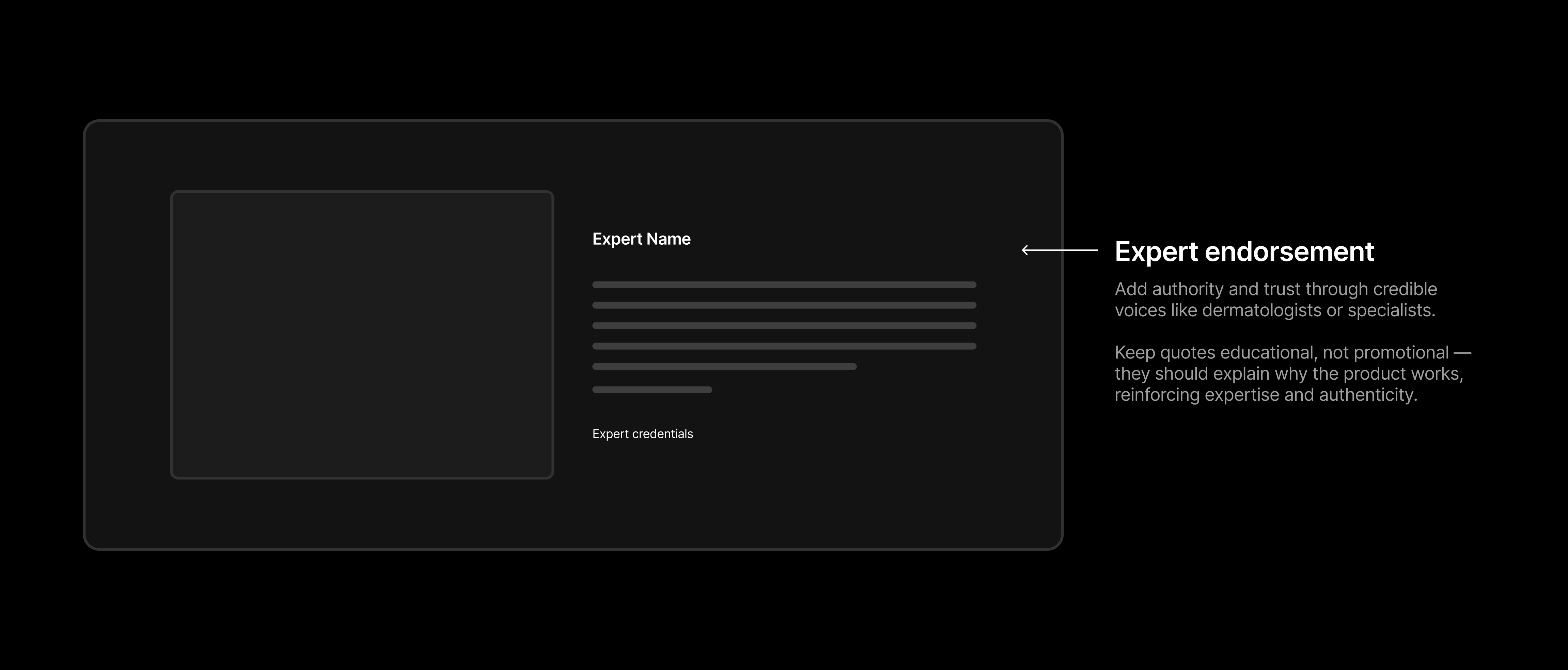
Expert endorsement: Add authority and trust through credible voices like dermatologists or specialists. Keep quotes educational, not promotional — they should explain why the product works, reinforcing expertise and authenticity.
Prompt Template
Fill in the blanks below, then copy and paste the entire prompt into Replo AI to generate this section.
Generate an Expert Endorsement section for @[product name].

━━━━━━━━━━━━━━━━━━━━━━━━━━━━━━━━━━━━━━━━━━━━━━
FILL IN YOUR DETAILS:
━━━━━━━━━━━━━━━━━━━━━━━━━━━━━━━━━━━━━━━━━━━━━━

Section label: ________________________________________
(Example: "Physician's Perspective" or "Expert's Perspective" or "Dermatologist's POV")

Expert headshot URL: ________________________________________
(Upload professional, high-quality photo)

Expert name: ________________________________________
(Example: "Dr. Ted Lain")

Expert credentials: ________________________________________
(Example: "Board Certified Dermatologist, Sanova Dermatology")

Expert quote (2-4 sentences): ________________________________________
(Example: "As we age, cell turnover slows, leaving excess skin debris that can manifest as visible signs of aging. This buildup can make it difficult for skin to respond to anti-aging serums and treatments. I've seamlessly integrated Cell Cycle Catalyst into my routine by using it at night, after cleansing, and before my retinoid and moisturizer. This new product is gentle enough to use daily.")

━━━━━━━━━━━━━━━━━━━━━━━━━━━━━━━━━━━━━━━━━━━━━━
DESIGN INSTRUCTIONS (don't edit):
━━━━━━━━━━━━━━━━━━━━━━━━━━━━━━━━━━━━━━━━━━━━━━

Create an Expert Endorsement section in my brand styles that includes:
- Dark or contrasting background for visual emphasis
- Section label at top: "Physician's Perspective" (or provided label)
- Two-column layout:
  - Left: Expert headshot photo (large, professional)
  - Right:
    - Expert quote in large, readable text
    - Expert name below quote
    - Expert credentials below name (smaller text)
- Quote should be:
  - Educational (explains why product works, how they use it, or the science)
  - NOT promotional or overly salesy
  - Reinforces expertise and authenticity
- Clean, professional typography with proper hierarchy
- Proper spacing and alignment

Place this right below the Science Explainer Section.
Section 7: Ingredients Carousel
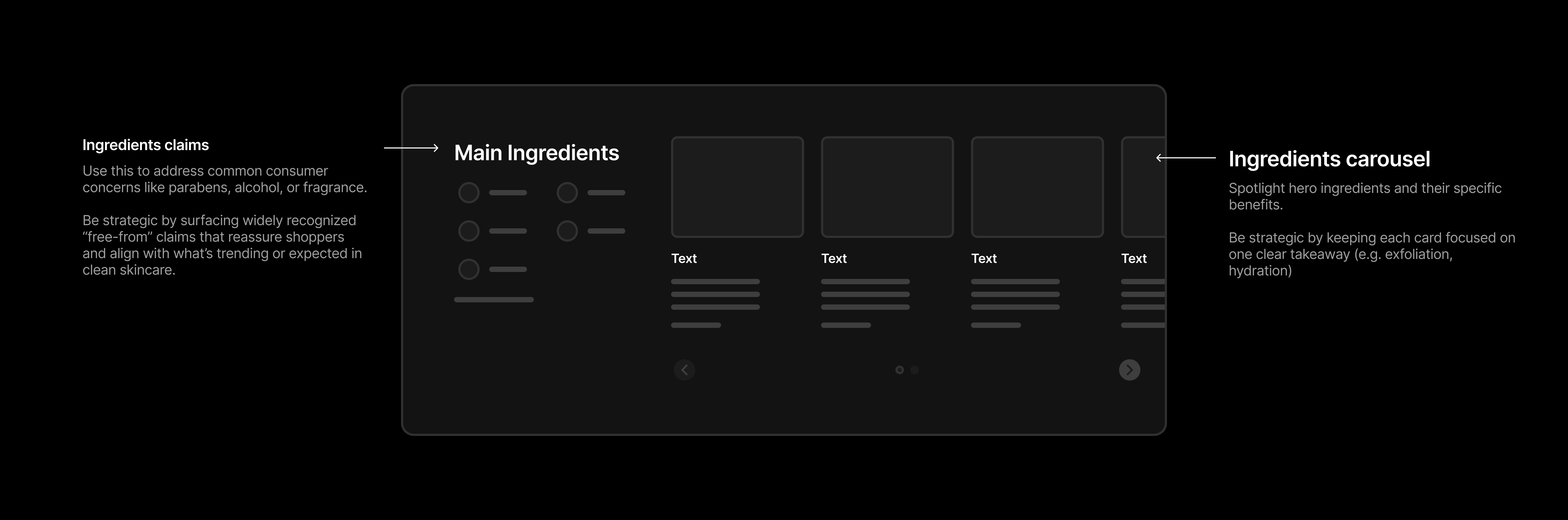
Ingredient claims: Use this to address common consumer concerns like parabens, alcohol, or fragrance. Be strategic by surfacing widely recognized “free-from” claims that reassure shoppers and align with what’s trending or expected in clean skincare.
Ingredients carousel: Spotlight hero ingredients and their specific benefits. Be strategic by keeping each card focused on one clear takeaway (e.g. exfoliation, hydration)
Prompt Template
Fill in the blanks below, then copy and paste the entire prompt into Replo AI to generate this section.
Generate an Ingredients section for @[product name].

━━━━━━━━━━━━━━━━━━━━━━━━━━━━━━━━━━━━━━━━━━━━━━
FILL IN YOUR DETAILS:
━━━━━━━━━━━━━━━━━━━━━━━━━━━━━━━━━━━━━━━━━━━━━━

PART 1 - INGREDIENT CLAIMS (Left Side):
List of ingredient claims/certifications: ________________________________________
(Example: Paraben-free, Alcohol-free, Fragrance-free, No Colorings, Silicone-free, Hypoallergenic, Non-comedogenic, Dermatologist-tested, Vegan, Cruelty-free, etc.)

PART 2 - HERO INGREDIENTS CAROUSEL (Right Side):
Add as many hero ingredients as you want to highlight (typically 3-5).

Ingredient 1:
Name with concentration: ________________________________________
(Example: "15% L-Ascorbic Acid")
Image URL: ________________________________________
(Upload close-up visual of ingredient or related imagery)
Short benefit (1 sentence): ________________________________________
(Example: "Excellent antioxidant benefits")
Expanded details (2-3 sentences for "READ MORE"): ________________________________________
(Example: "Excellent antioxidant benefits, this highly effective form of pure vitamin C helps neutralize free radicals and protect against oxidative stress while brightening skin tone.")

Ingredient 2:
Name with concentration: ________________________________________
(Example: "1% Alpha Tocopherol")
Image URL: ________________________________________
Short benefit (1 sentence): ________________________________________
Expanded details (2-3 sentences for "READ MORE"): ________________________________________

Ingredient 3:
Name with concentration: ________________________________________
(Example: "0.5% Ferulic Acid")
Image URL: ________________________________________
Short benefit (1 sentence): ________________________________________
Expanded details (2-3 sentences for "READ MORE"): ________________________________________

[Add more ingredients as needed - copy the ingredient template above]

━━━━━━━━━━━━━━━━━━━━━━━━━━━━━━━━━━━━━━━━━━━━━━
DESIGN INSTRUCTIONS (don't edit):
━━━━━━━━━━━━━━━━━━━━━━━━━━━━━━━━━━━━━━━━━━━━━━

Create an Ingredients section in my brand styles that includes:
- Two-column layout
- Left column:
  - "Main Ingredients" headline
  - Ingredient claim badges/icons displayed in a grid (with icons)
  - "See Full List" link at bottom
- Right column:
  - "Main Ingredients" headline (repeated)
  - Horizontal carousel of ingredient cards
  - Each card includes:
    - Large ingredient image at top
    - Ingredient name with concentration as headline
    - Short benefit text (1 sentence)
    - "READ MORE >" expandable link
    - When expanded, shows 2-3 additional sentences
  - Carousel navigation arrows at bottom
  - Pagination dots
- Keep each card focused on ONE clear takeaway (e.g., exfoliation, hydration)
- Clean, scannable design with clear visual hierarchy

Place this right below the Expert Endorsement Section.
Section 8: Routine Builder
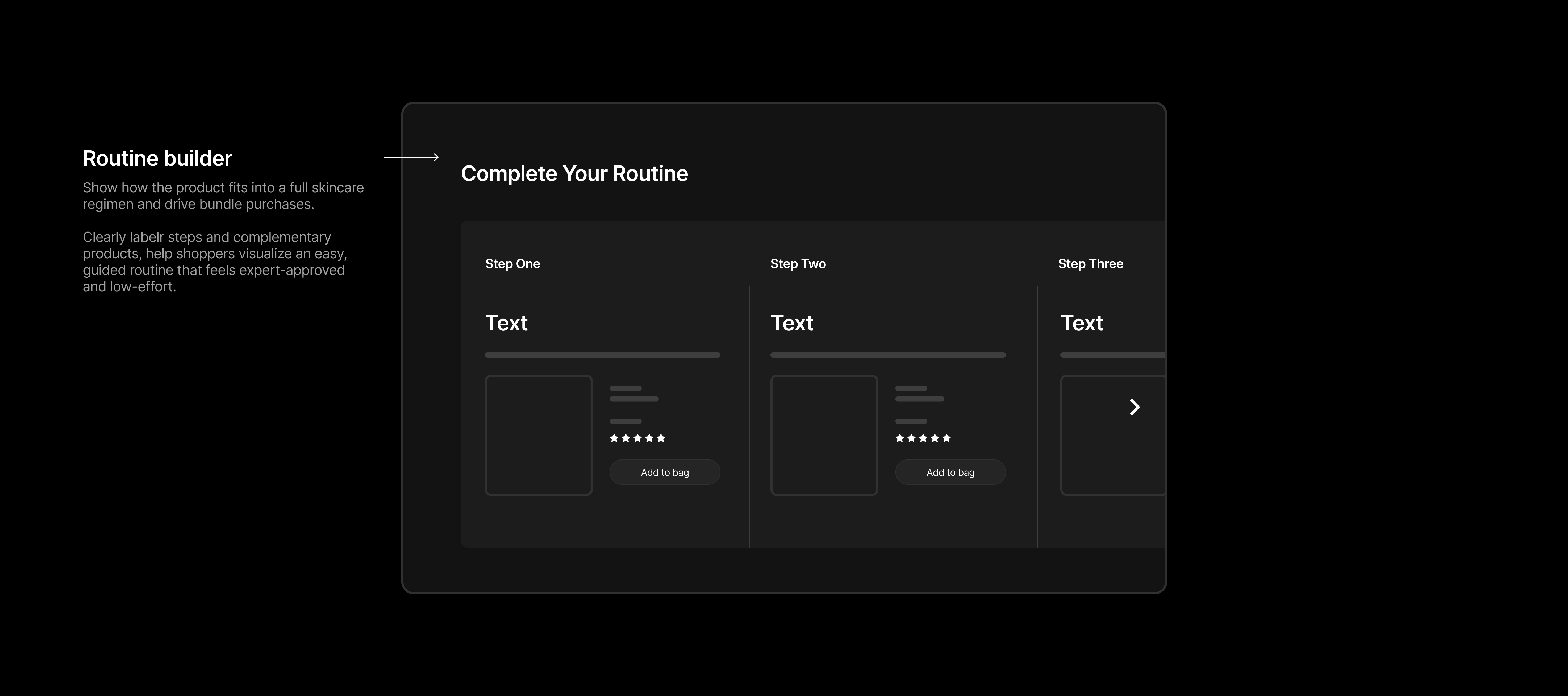
Routine builder: Show how the product fits into a full skincare regimen and drive bundle purchases. Clearly labelr steps and complementary products, help shoppers visualize an easy, guided routine that feels expert-approved and low-effort.
Prompt Template
Fill in the blanks below, then copy and paste the entire prompt into Replo AI to generate this section.
Generate a Routine Builder section for @[product name].

━━━━━━━━━━━━━━━━━━━━━━━━━━━━━━━━━━━━━━━━━━━━━━
FILL IN YOUR DETAILS:
━━━━━━━━━━━━━━━━━━━━━━━━━━━━━━━━━━━━━━━━━━━━━━

Add as many routine steps as needed (typically 3-5 steps).

Step 1:
Step label: ________________________________________
(Example: "Step One")
Step name: ________________________________________
(Example: "Cleanse")
Step description (1 sentence): ________________________________________
(Example: "Cleansers whisk away substances that lead to clogged pores and dull skin.")
Product recommendation: @________________________________________
(Reference product by typing @ and product name)

Step 2:
Step label: ________________________________________
(Example: "Step Two")
Step name: ________________________________________
(Example: "Exfoliate")
Step description (1 sentence): ________________________________________
(Example: "Exfoliants balance skin and shed built-up layers, enhancing skincare effectiveness.")
Product recommendation: @________________________________________

Step 3:
Step label: ________________________________________
(Example: "Step Three")
Step name: ________________________________________
(Example: "Moisturize")
Step description (1 sentence): ________________________________________
(Example: "All Paula's Choice moisturizers are created with complex formulas that address more than hydration.")
Product recommendation: @________________________________________

[Add more steps as needed - copy the step template above]

━━━━━━━━━━━━━━━━━━━━━━━━━━━━━━━━━━━━━━━━━━━━━━
DESIGN INSTRUCTIONS (don't edit):
━━━━━━━━━━━━━━━━━━━━━━━━━━━━━━━━━━━━━━━━━━━━━━

Create a Routine Builder section in my brand styles that includes:
- Section headline: "Complete Your Routine"
- Horizontal carousel/grid showing all routine steps
- Each step card includes:
  - Step label at top (e.g., "Step One", "Step Two")
  - Large step name (e.g., "Cleanse", "Exfoliate")
  - Step description (1 sentence explaining what this step does)
  - Product card with:
    - Product image
    - Product name
    - Price (current + crossed-out if on sale)
    - Star rating + review count
    - "ADD TO BAG" button
- Navigation arrow on right side for carousel
- Clean spacing between steps with vertical dividers
- Shows complementary products to drive bundle purchases
- Easy to visualize the complete routine flow

Place this right below the Ingredients Section.