Shopify A/B Test Examples You Can Launch In Your Store in Minutes
See real Shopify A/B test examples, clear steps, and ideas to increase conversions.

Last updated: 2026-01-07
Takeaways
Our top pick of A/B testing ideas include hero images, CTA button design, headline, product image, social and testimonial sections, and price or offer testing. All of these examples are meant to help brands target higher conversion rates.
Run one-variable experiments for two full business cycles and base decisions on statistical significance, not gut feel.
Start by prioritizing a high-impact test, launch a clean variant, and implement the winner before moving to the next idea.
What Shopify A/B Testing Is And Why It Matters
In plain terms, A/B testing compares two versions of a page or element—one being the present control, and the other being the new hypothesis you have—to see which one causes more people to act.
The goal of a test is to validate better offers, clearer messaging, fewer friction points, and faster journeys through your funnel. With A/B testing, you get to remove guesswork and replace it with evidence. That shift compounds wins and protects you from costly mistakes.
- Data over gut feelings: Decisions are based on observed behavior, not opinions.
- Incremental gains compound: Small conversion lifts stack into serious revenue over time.
- Lower customer acquisition costs: Better on-site conversion stretches every ad dollar further.
What is split testing or A/B testing for landing pages?
A/B testing is the practice of sending similar randomized audience groups to two page versions at the same time to measure which version drives better results against a specific metric, such as conversion rate. The two versions usually only differ on a single element, with the original version being the control, and the changed version being the variable.
The results of the A/B test determine whether or not the changed version can drive better performance for that given metric.
To learn more about the exact specifics of how to run an A/B test, either as a beginner or an advanced user, check out this full guide.
Shopify documents examples where changing creative or offers delivered meaningful lifts on key pages, which you can explore in these examples. With a solid grasp on A/B testing as a Shopify user, you'll be able to run cleaner tests, trust results, and scale winners with confidence.
How A/B Testing Shopify Stores Works
You split traffic randomly between a control and a variant to avoid bias from devices, channels, or time of day. Then you define one primary conversion event—purchases, revenue per session, or add-to-cart—and let it run through at least two full weekly cycles. That timing catches weekday–weekend behavior swings so you don’t chase noise.
Show both versions of the element to your chosen audience simultaneously.
Replo A/B testing defaults to a 50/50 split, but if you’d like to minimize the scope of your test by allocating more of the traffic to your control, you can easily set the % of traffic you’d like to divert in the campaign setup!
Track device segments and source segments in your analytics so you can spot wins that hide in the averages. That way you implement variants that work for most shoppers and avoid regressions for key groups.
Monitor key metrics, such as conversion rates, click-through rates, and revenue, to determine which version performs better.
The Importance of Statistical Significance
Before you launch, confirm you can reach statistical significance and sample size in two to four weeks. If not, you’ll risk inconclusive results and might be better served by qualitative research, usability fixes, and faster traffic growth first.
Statistical significance tells you the result likely isn’t random noise. If you call tests early, you risk shipping false positives that quietly drain revenue.
- Statistically significant winner: Confidence is high; implement the winning variant.
- No significance yet: It could be noise; keep the test running to reach your threshold.
- No winner after sufficient data: Variants are similar; test a different lever.
As a planning aid, estimate needed visitors per variant to reach statistical significance based on your baseline rate and minimum detectable lift; this approach is well explained in Qualtrics’ guide.
As a benchmark, many programs aim for tests to complete in two business cycles. That guideline helps account for weekday cadence and marketing pulses surfaced in Shopify’s expert advice on timing.
For planning, a simple significance calculator is your friend—input your current conversion rate and minimum detectable effect to estimate how many visitors per variant you need using this approach. We also like the stat sig calculator by Evan Miller for a more detailed and nuanced approach.
Low traffic makes every outlier louder. That’s why the renowned write-up on testing mistakes urges rigor in design and analysis to prevent misleading wins. If you’re not there yet, prioritize research and speed-to-value changes while you build volume.
Additionally, when you're getting started, it's best to avoid running multiple A/B tests on the same webpage or audience simultaneously.
If you’d like to jump into multivariate testing, many A/B Testing tools like Replo allow you to drive and distribute traffic to multiple variants. Just be aware that the more variants you run, you’ll have to drive more traffic for a longer duration to ensure significance.
Learn more from our complete guide on statistical significance.
How To Run An A/B Test In Four Steps
You’ll move faster if you follow a simple sequence. Keep it tight, document decisions, and make winning the default.
- Define a revenue-focused hypothesis. Tie your change to a purchase behavior, not just a click. Example: “If we show benefit-first hero copy, purchases will increase.”
- Build variants with an app or a theme duplicate. Use a testing app, or duplicate your theme for larger layout changes.
- Split traffic and let the test run full cycles. Avoid launching during peak promos unless that’s your target state. Don’t overlap tests on the same audience and page.
- Analyze significance and promote the winner. Check device segments before rolling out globally. Implement the winner as your new control, then queue the next idea.
Keep your test backlog prioritized by expected revenue lift. That simple discipline multiplies the impact of the same testing effort.
A/B Testing Ideas For Your Shopify Store
Here are a few ideas for A/B tests that can be implemented in your store.
Follow along in your store live! For a refresher on how our A/B Testing tool works, check out our docs here.
You will want to start where intent and traffic meet. High-visibility, high-intent pages give you faster learning and bigger upside:
Landing Pages
Dedicated campaign pages focus attention and isolate variables, making them perfect for fast learning from a clean A/B testing Shopify setup; if you’re new to landing-page experiments, here’s a helpful walkthrough on how to A/B test landing pages.
Product Detail Pages
Product Detail Pages (PDPs) are where decisions happen. Images, descriptions, and the Call To Action (CTA) button are prime candidates because they shape purchase intent on the spot.
Homepage Above the Fold
“Above the fold” is what loads before scrolling. This hero area sets your story and influences bounce rates within seconds.
Cart and Checkout Pages
These pages carry the highest intent. Standard plans limit checkout testing, but Shopify Plus unlocks deeper options, so you can remove friction where it hurts most.
Once you've nailed down which pages to start testing, here's a few example elements that you test on those pages:
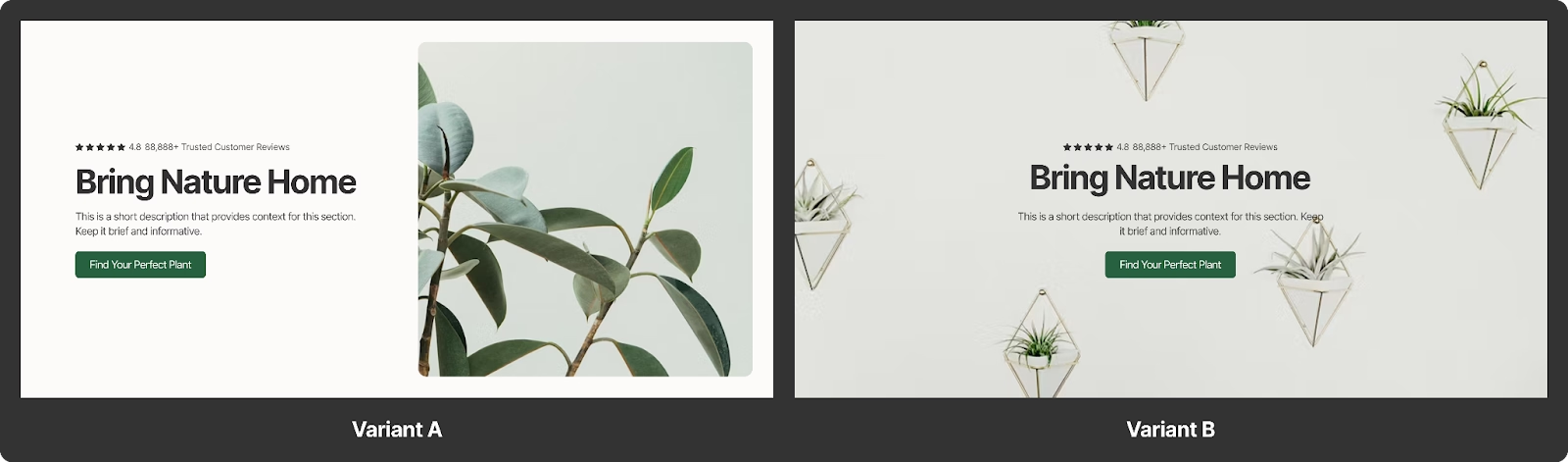
Test #1: Hero Images
As a gateway to your whole store, Hero images on your home page or ad landing page is the first thing most customers will see whether they find your store on google, or via an ad (On a random search for 100 Shopify store’s ads libraries, we’ve seen 3/10 stores use their home pages as ad landing pages).
Our recommendation is to take a look at the hero header sections for top brands in your vertical in our Template Library and try a few new concepts out!
How to run this in Replo:
- Take your homepage or ad landing page built in Replo and duplicate it.
- Copy a hero section from our Template Library.
- Replace the existing hero section with the hero section from the library, apply your brand styling and publish!
- In the experiments tab, create your Replo forever link URL (you can reuse this for future experiments), take the original page and set it as your control, and set the new page as your variant and launch the test!
- You’re now ready to drive traffic to your A/B test URL. We recommend setting up an adset specifically for testing and using that adset and ad for your future experiments (you’ll be able to use the same experiment url going forward, so you won’t need to set your ad into a learning phase for each test you run).

Test #2: CTA’s and Color
CTA’s are what draws the customers attention to beginning the buying journey. They’re part of customer quizzes, collections pages, email collection forms, and almost every page of your Shopify site.
While it may seem like a small optimization, simple treatments and tests like color etc. have led to some pretty large improvements in Shopify store conversion rates compounded with other experiments (after all, a 5% improvement for a $500k/mo store is a revenue increase of $300k for the year)!
How to run this Shopify A/B Test in Replo:
- Take any page you’ve built in Replo and duplicate it.
- Select all of the CTA’s on the duplicated page (You can use Replo’s multi-select Shift+Click to select all of them), and batch edit them to a color, or text style that you’d like to try out (for ex: Changing a dark green button to a brighter, poppier yellow)
- In the experiments tab, create your Replo forever link URL (you can reuse this for future experiments), take the original page and set it as your control, and set the new page as your variant and launch the test!
- You’re now ready to drive traffic to your A/B test URL. Go forth and experiment!
.avif)
Test #3: Headline Testing
Another test for our header, we have headline testing. With Replo, you can test different variants of your customer messaging to find what truly speaks to your audience where it matters. (If you’re at a loss for ideas, check out our AI tool that helps generate on brand copy for your page)
How to run this Shopify A/B Test in Replo:
- Take any page you’ve built in Replo and duplicate it.
- Select your Headline in the new variant, and either change it to a different message if you have one in mind, or click the orange wand in the page builder and have us generate a new one for you!
- In the experiments tab, create your Replo forever link URL (you can reuse this for future experiments), take the original page and set it as your control, and set the new page as your variant and launch the test!
- You’re now ready to drive traffic to your A/B test URL.
.avif)
Test #4: Product Images
Moving onto our buy box, the most important part of lower funnel pages like your PDP's and offer pages (often used for retargeting campaigns, brand campaigns etc.), you can test the most important element—the product image!
Beyond just changing out the angle and order of the elements, you can do things like add social proof/awards/pages to the image and test them against pure product imagery or test different creative concepts (plain background vs feature callouts).
How to run this Shopify A/B Test in Replo:
- Take any page with a buy box you’ve built in Replo and duplicate it.
- Disconnect the product dynamic data on the image section of the new variant so that it doesn’t pull imagery directly from Shopify and create a new set of images/image carousels. (Note: for an easy test, do this on a product that doesn’t have variants that switch colors/styles, otherwise you’ll need to set up a link from the style selector to a set of product images)
- In the experiments tab, create your Replo forever link URL (you can reuse this for future experiments), take the original page and set it as your control, and set the new page as your variant and launch the test!
- You’re now ready to drive traffic to your AB test URL!
.avif)
Test #5: Product Descriptions
While less eye-catching than the product headline or product image itself, for serious buyers the description in your product box is what convinces them to pull the trigger and add to cart. You can test styling, brand voice and information layout (bullet points etc.) to incrementally increase your conversion rate.
How to run this Shopify A/B Test in Replo:
- Take any page with a buy box you’ve built in Replo and duplicate it.
- Disconnect the product dynamic data on the description section of the new variant so that it doesn’t pull your description from Shopify and create a description. Similar to the headline, you can use our AI tool to generate ideas; my personal favorite thing to do is to also ask it to give me an SEO optimized variant to try out.
- In the experiments tab, create your Replo forever link URL (you can reuse this for future experiments), take the original page and set it as your control, and set the new page as your variant and launch the test!
- You’re now ready to drive traffic to your A/B test URL! Go forth and experiment!
.avif)
Test #6: Social Proof and Testimonials
It’s common practice now to have social proof and testimonials high up on most of your pages. Consumers need to be able to trust brands before purchasing, and social proof of real customer interactions is the best way to do that!
This test involves testing different treatments to testimonial sections to determine what works best for your store. If you don't have testimonials on your page, test a version of your page with one.
We have tons of testimonial templates for you to choose from, including:
- Testimonial Carousel
- Testimonial with Two Images
- Standard 3 Highlight Testimonial
- Customer Quote Testimonial
There’s much more, so make sure to check out our Template Library and add them directly to your store!
How to run this Shopify A/B Test in Replo:
- Take any page you’ve built in Replo and duplicate it.
- Grab a new variant of testimonial and apply your styling to it on the new page. Swap the existing testimonial out.
- In the experiments tab in Replo, create your Replo forever link URL (you can reuse this for future experiments), take the original page and set it as your control, and set the new page as your variant and launch the test!
- You’re now ready to drive traffic to your A/B test URL! Go forth and experiment!
.avif)
Test #7: Price Testing
One of the biggest topics in ecommerce is how much discounting to actually use in your ads. It may be tempting to chase more conversions by offering discount codes, but everyone who's run a brand before knows that discounting is often a slippery slope.
As such, price testing via ads is the simplest way to test price points to a narrow group of your customers (once the ads done running, no one will see the conflicting prices on your site).
How to run this Shopify A/B Test in Replo:
The easiest way to do this on Replo is with Shopify Discount Codes—you can view our docs for a refresher.
- Duplicate a page with a product buy box, and create a new page and implement the new discount code (this will add a discount code when someone adds to cart to show the accurate price). It’s recommended that you set the discount code to only be valid for that item to mitigate any other storewide effects.
- In the experiments tab, create your Replo forever link URL (you can reuse this for future experiments), take the original page and set it as your control, and set the new page as your variant and launch the test.
- You’re now ready to drive traffic to your A/B test URL!
Bonus: PDP vs Listicle
Most of the tests that we suggested above are systematic ways to improve your landing page by controlling a single variable at a time. If you’re looking to overhaul your funnels entirely and test new styles of pages without fully committing all of your ad spend to one, you can test complete pages side by side like a PDP vs a Listicle.
The Replo Template Library has hundreds of templates for real brands and several have run both PDP’s and Listicles in parallel. If you’re looking for a common style among both, you can check out our ARMRA PDP Template and the corresponding ARMRA Listicle Template.
How to run this Shopify A/B Test in Replo:
- Take any two pages (for this example, we’re taking a PDP vs a Listicle, but you can swap those out with standard offer pages, advertorials, quiz collection pages etc.). If you’re looking to build a simple test you can take any two templates, apply your brand styles to them and run them as a test.
- In the experiments tab, create your Replo forever link URL (you can reuse this for future experiments), take one page and set it as your control, and set the other page as your variant and launch the test.
- You’re now ready to drive traffic to your A/B test URL.
There you go—the fastest way to test new landing page concepts out there.
.avif)
Bonus #2: Theme Testing
While you generally can’t test entire themes on Replo (there are workarounds to this and it is easier if you are a low or single SKU product store, but we’ll go into that more in depth in another article), you can test portions of a theme (like a PDP) before committing to a full buildout of a brand new store.
This is beneficial in many ways, the primary one being that it saves you a lot of time as you can test something like a product offer page with many different theme styles without having to actually set multiple themes live and disrupt your existing store performance (the traditional way of testing themes).
How to run this Shopify A/B Test in Replo:
- If you already have a page of that type live in Replo, we’d recommend using that as your control and creating a new page of the same type. Otherwise, take any two pages of the same type from our Template Library (or build 2 variants of the same page yourself) and create a page for each. For this example, we’ve taken the Suri product template and our Subscription Prescription product template. If you already have a page of that type live in Replo, we’d recommend using that as your control and creating a new page of the same type.
- In the experiments tab, create your Replo forever link URL (you can reuse this for future experiments), take your original page and set it as your control, and set the other page as your variant and launch the test!
- You’re now ready to drive traffic to your A/B test URL.
- Once you find the winner that you’re satisfied with, you can then commit to building out your whole theme with that page as your base.
Test as many page types as you'd like, you have hundreds to choose from in our free Template Library!
Common Mistakes That Tank Test Results
You can run fast and still be wrong if the design is flawed. Avoid these common traps so you don’t implement false winners.
Ending Tests Too Early
Stopping at the first sign of significance is a recipe for regret. Run tests through two business cycles to catch weekday patterns and catalog pulses documented in Shopify’s expert guidance on duration. Premature stops inflate false positives and waste future cycles.
Testing Multiple Changes At Once
Bundle too much and you’ll never know what worked. If you want to test many elements, iterate: promote the winner, then test the next variable. That’s how you isolate causal drivers and build knowledge.
Ignoring Mobile-Desktop Differences
A desktop win can be a mobile loss. Segment results by device and viewport before you ship a change globally. You’ll catch hidden regressions early and avoid revenue leakage.
One more pitfall is designing tests that violate fundamental assumptions—like uneven randomization or peeking. The classic cautionary notes are worth a reread before you start to stay honest.
Keep Learning And Start Testing With Replo
You’re ready to design a simple, disciplined program and start shipping winners. Pick one high-impact idea, launch a clean test, and review significance after two full business cycles.
You’ll find it easier to learn from real Shopify A/B test examples once you’re testing on your own traffic.
Sign up for Replo and get your first test live this week.
FAQs About Shopify A/B Testing
How long should each Shopify A/B test run?
You should let most tests run at least two weeks to capture weekday and weekend behavior. Many stores choose two full business cycles to reduce false positives.
Which Shopify apps make split testing easiest?
Replo makes it easy to A/B test pages without code, while forever links. Several Shopify apps also streamline zero-code page-level testing.
Can I A/B test the checkout on Shopify Plus?
Shopify Plus gives you more control and testing flexibility around checkout through customization. Standard Shopify has limited checkout testing, so focus tests earlier in the funnel.
What is a good conversion rate lift to aim for?
Consistent small wins compound, so aim for reliable, significant lifts rather than moonshots. A solid conversion rate ranges around 3-5%, though the specifics may differ across industries. A steady cadence of learning beats one-off spikes every time.