Examples
Product page examples, and where shoppers actually click
Twenty real product pages captured on a phone, next to what over 6 million clicks on over 2,200 stores' product pages say shoppers tap.
The short answer
Shoppers on a phone spend most of their taps on two things: the photos (39% of the taps we could name) and the size, color or flavor options (34%). For every tap on add to cart there are about 9 on photos and options. The pages below make those two parts easy to use.
Photos and options get 73% of phone taps on a product page
We grouped every click on over 2,200 stores' product pages by the part of the page it hit. 84% of the clicks came from phones.
- Product photos and video39.0%
- Size, color and other options33.6%
- Add to cart and buy buttons7.9%
- Details and FAQ dropdowns6.3%
- Menu and other links4.9%
- Cookie and consent banners3.3%
- Other products' links2.9%
- Quantity picker1.2%
- Reviews and star ratings0.4%
- Sticky add-to-cart bar0.2%
- Size guide0.2%
Base: over 6 million clicks on product pages, 3 samples of 40 minutes spread over a week, over 2,200 stores in each. Each store's share, then the average store. 33% of phone taps hit an element we could name; the rest landed on text or boxes without one.
| Part of the page | Phone | Desktop | Phone, share of all taps |
|---|---|---|---|
| Product photos and video | 39.0% | 43.7% | 12.9% |
| Size, color and other options | 33.6% | 33.4% | 11.1% |
| Add to cart and buy buttons | 7.9% | 6.4% | 2.6% |
| Details and FAQ dropdowns | 6.3% | 3.7% | 2.1% |
| Menu and other links | 4.9% | 6.2% | 1.6% |
| Cookie and consent banners | 3.3% | 1.3% | 1.1% |
| Other products' links | 2.9% | 3.6% | 1.0% |
| Quantity picker | 1.2% | 0.9% | 0.4% |
| Reviews and star ratings | 0.4% | 0.5% | 0.1% |
| Sticky add-to-cart bar | 0.2% | 0.1% | 0.1% |
| Size guide | 0.2% | 0.1% | 0.1% |
Reviews, size guides and sticky bars rarely carry a name our tracking reads, so their shares are floors, not totals. How far shoppers scroll before they tap is in the scroll depth study, and how to read your own in the scroll map guide.
What the clicks mean for your product page
Spend the first phone screens on the parts shoppers actually use.
Make every photo swipe and zoom
Photos take 39% of the phone taps we could name. A photo that does nothing wastes them.
Show options as buttons
Options take 34% of named taps. Buttons show what's in stock at a glance; dropdowns hide it.
Keep add to cart in reach
Shoppers tap photos and options about 9 times per cart tap. Keep the button near them.
Answer questions in dropdowns
Detail and FAQ dropdowns take 6% of named taps: shipping, sizing and ingredients get opened.
The fixes step by step are in what to change on a product page, and the parts of a PDP in what a PDP is.
20 product pages, checked against the click data
Ordered by how many of the seven parts in the click data each page shows on a phone, then by brand name. None of these brands is a Replo customer.
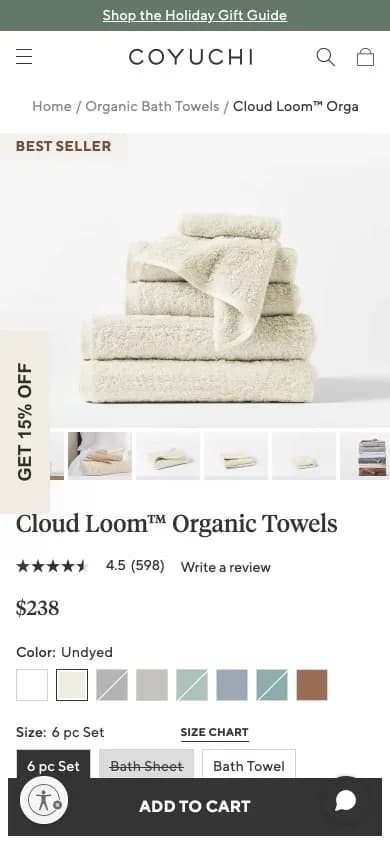 9:41coyuchi.com
1. Home
Coyuchi
Cloud Loom Organic Towels
7 of 7 partsFits color swatches, set sizes, a size chart link and add to cart onto one phone screen.
Swipeable photos
Option buttons
Add to cart on the first screen
Detail dropdowns
Rating by the title
Sticky add-to-cart bar
Size guide
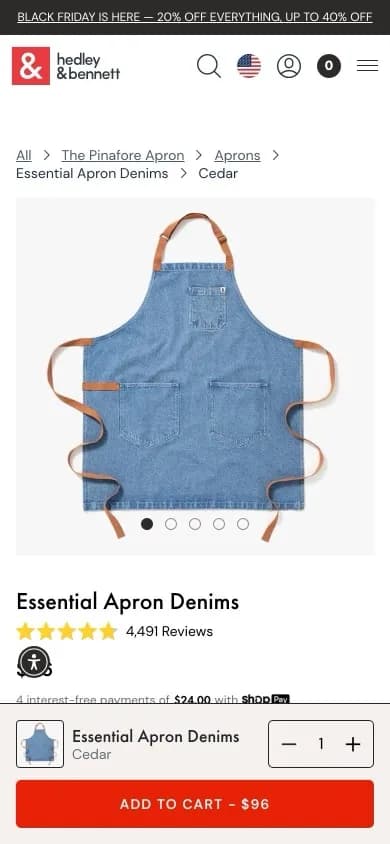 9:41hedleyandbennett.com
2. Home
Hedley & Bennett
Essential Apron Denims (Cedar)
7 of 7 partsPuts the price inside the sticky button, “Add to Cart - $96”, next to a quantity stepper and the chosen color.
Swipeable photos
Option buttons
Add to cart on the first screen
Detail dropdowns
Rating by the title
Sticky add-to-cart bar
Size guide
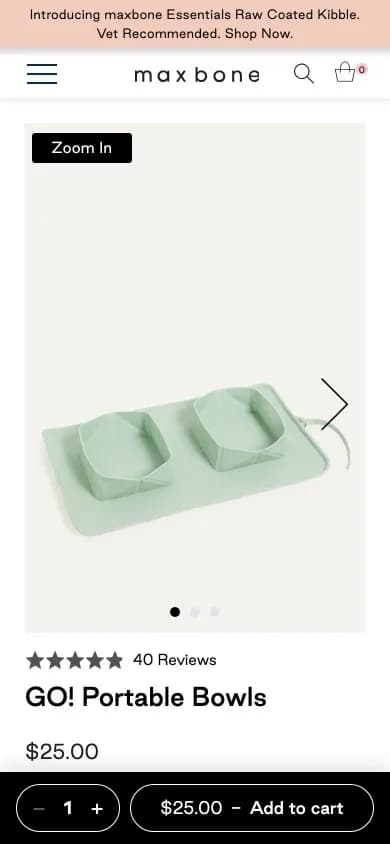 9:41maxbone.com
3. Pet
Maxbone
GO! Portable Bowls
7 of 7 partsAdds a “Zoom in” button on the photo and keeps quantity and price in the pinned add-to-cart bar from the first screen.
Swipeable photos
Option buttons
Add to cart on the first screen
Detail dropdowns
Rating by the title
Sticky add-to-cart bar
Size guide
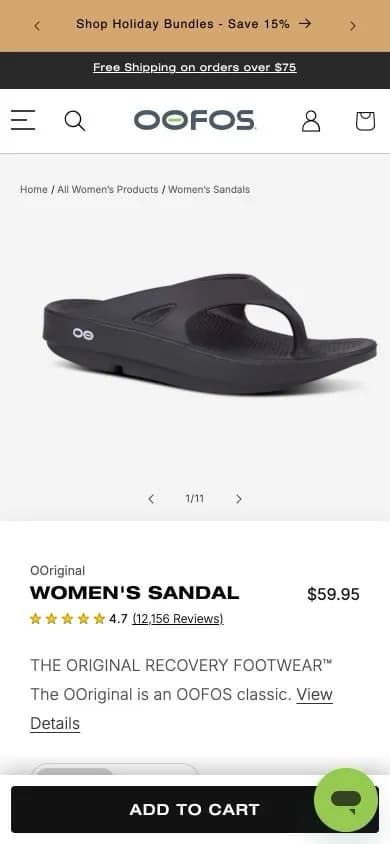 9:41oofos.com
4. Footwear
OOFOS
Women's OOriginal Sandal
7 of 7 partsPins add to cart to the bottom of the first screen and adds a size guide by the size buttons, so a fit question never stalls the sale.
Swipeable photos
Option buttons
Add to cart on the first screen
Detail dropdowns
Rating by the title
Sticky add-to-cart bar
Size guide
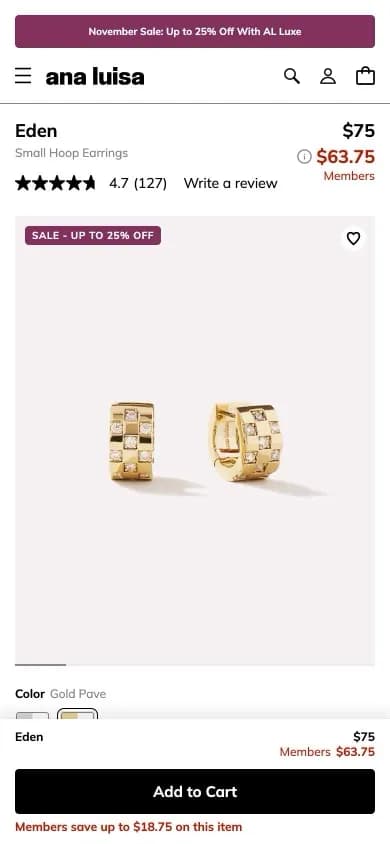 9:41analuisa.com
5. Jewelry
Ana Luisa
Eden Small Hoop Earrings
6 of 7 partsShows the member price beside the regular price, and the sticky bar repeats the member saving as shoppers scroll.
Swipeable photos
Option buttons
Add to cart on the first screen
Detail dropdowns
Rating by the title
Sticky add-to-cart bar
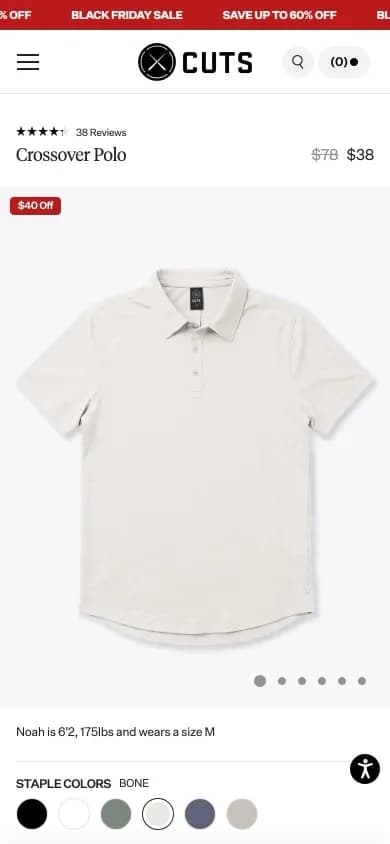 9:41cutsclothing.com
6. Apparel
Cuts
Crossover Polo
6 of 7 partsPuts a fit note, “Noah is 6'2, 175lbs and wears a size M”, between the photos and the color circles, where most taps already land.
Swipeable photos
Option buttons
Detail dropdowns
Rating by the title
Sticky add-to-cart bar
Size guide
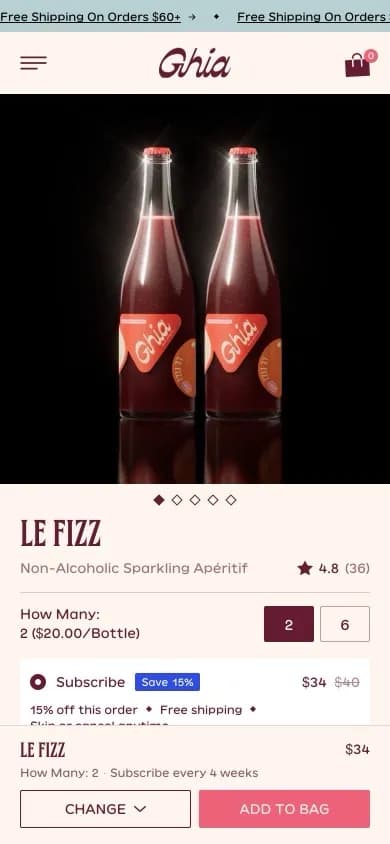 9:41drinkghia.com
7. Food and drink
Ghia
Le Fizz
6 of 7 partsRepeats the current choice in the sticky bar, “How many: 2 · Subscribe every 4 weeks”, so shoppers see what they're adding.
Swipeable photos
Option buttons
Add to cart on the first screen
Detail dropdowns
Rating by the title
Sticky add-to-cart bar
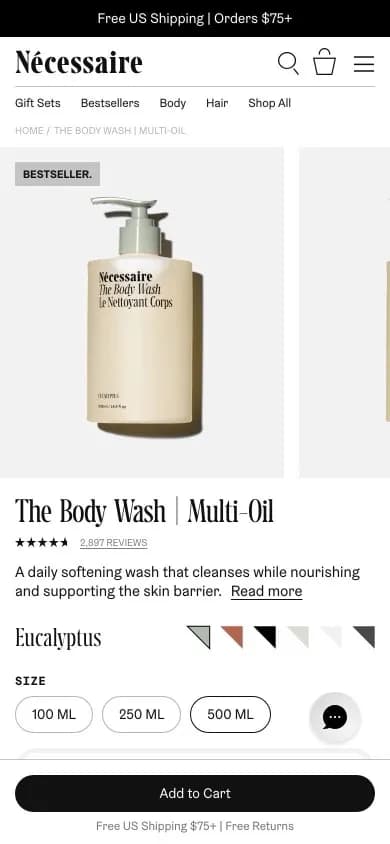 9:41necessaire.com
8. Skincare
Nécessaire
The Body Wash, Multi-Oil
6 of 7 partsDraws each scent as a small chip in the bottle's color, so the option buttons double as a preview of the product.
Swipeable photos
Option buttons
Add to cart on the first screen
Detail dropdowns
Rating by the title
Sticky add-to-cart bar
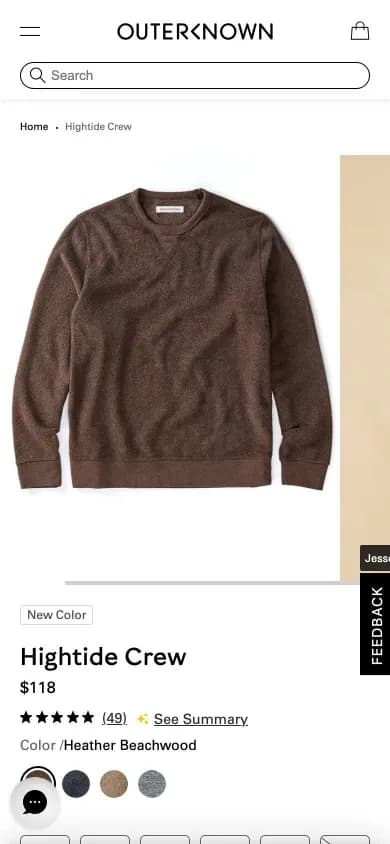 9:41outerknown.com
9. Apparel
Outerknown
Hightide Crew
6 of 7 partsStrikes through sold-out sizes on the size buttons, so the options shoppers tap most show what's in stock before they choose.
Swipeable photos
Option buttons
Detail dropdowns
Rating by the title
Sticky add-to-cart bar
Size guide
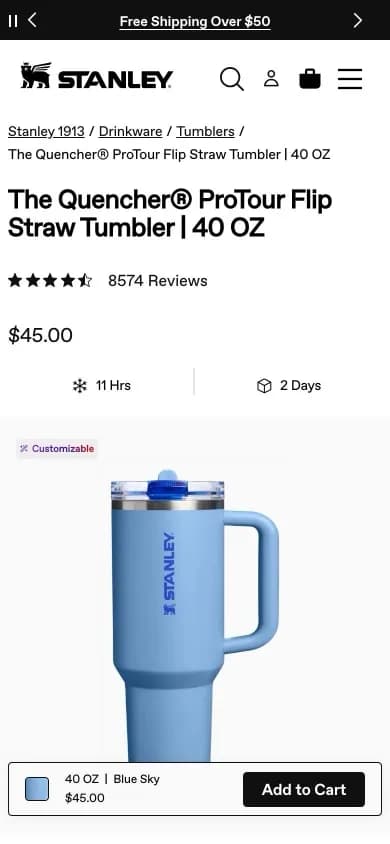 9:41stanley1913.com
10. Outdoor and fitness
Stanley
The Quencher ProTour Flip Straw Tumbler, 40 OZ
6 of 7 partsShows sizes as buttons and colors as a swatch grid, then repeats the chosen size, color and price in the sticky bar.
Swipeable photos
Option buttons
Add to cart on the first screen
Detail dropdowns
Rating by the title
Sticky add-to-cart bar
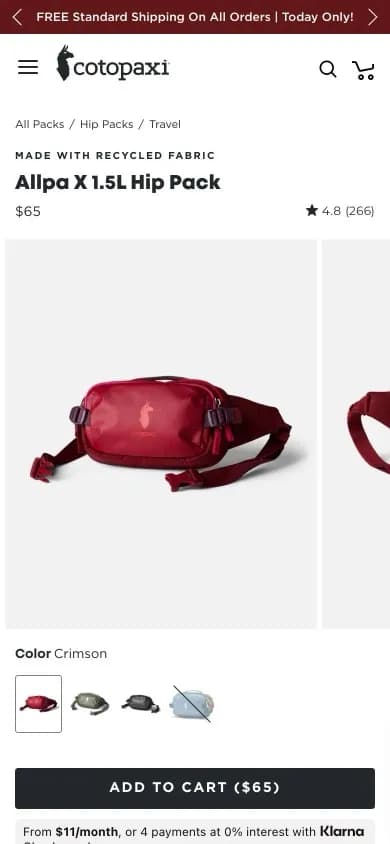 9:41cotopaxi.com
11. Outdoor and fitness
Cotopaxi
Allpa X 1.5L Hip Pack
5 of 7 partsUses photo swatches for each color, sold-out ones struck through, with “Add to Cart ($65)” on the same screen.
Swipeable photos
Option buttons
Add to cart on the first screen
Rating by the title
Sticky add-to-cart bar
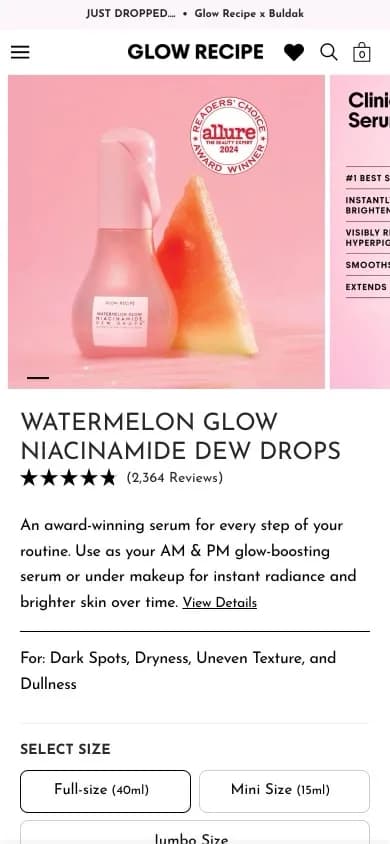 9:41glowrecipe.com
12. Skincare
Glow Recipe
Watermelon Glow Niacinamide Dew Drops
5 of 7 partsStates who it's for, “Dark Spots, Dryness, Uneven Texture, and Dullness”, right above the three size buttons.
Swipeable photos
Option buttons
Detail dropdowns
Rating by the title
Sticky add-to-cart bar
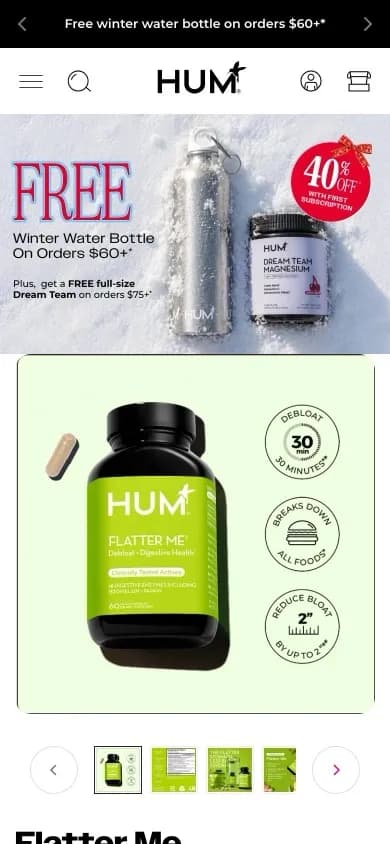 9:41humnutrition.com
13. Supplements
HUM Nutrition
Flatter Me
5 of 7 partsPuts the claim badges, “30 min debloat”, on the product photo itself, so the gallery sells before anyone reads.
Swipeable photos
Option buttons
Detail dropdowns
Rating by the title
Sticky add-to-cart bar
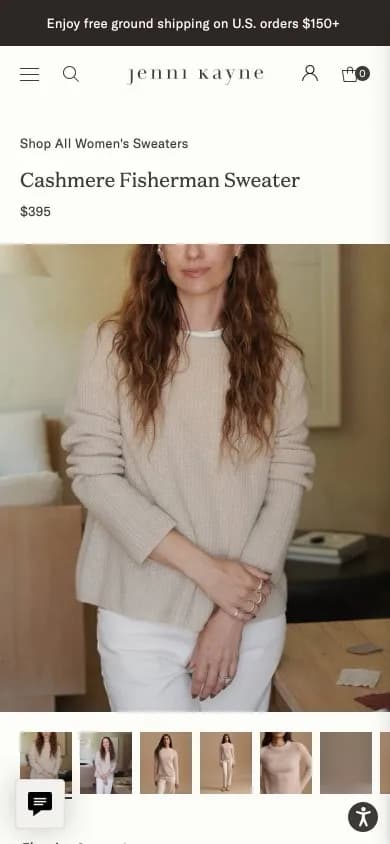 9:41jennikayne.com
14. Apparel
Jenni Kayne
Cashmere Fisherman Sweater
5 of 7 partsKeeps the photo strip, size buttons and a sticky “Select a size” bar together, so every photo swipe ends near the choice.
Swipeable photos
Option buttons
Detail dropdowns
Sticky add-to-cart bar
Size guide
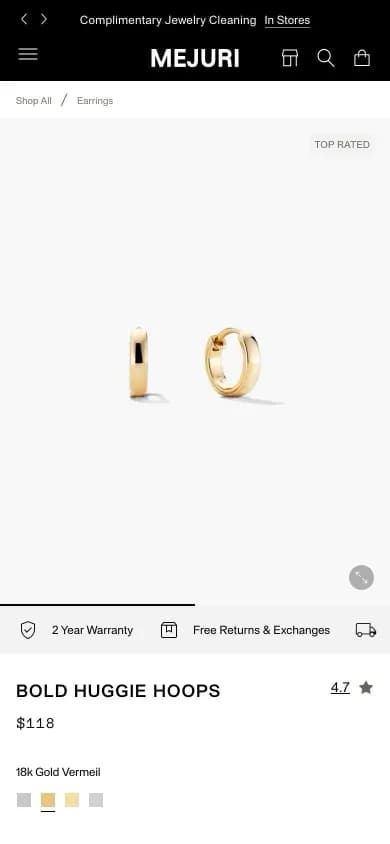 9:41mejuri.com
15. Jewelry
Mejuri
Bold Huggie Hoops
5 of 7 partsPuts “2 Year Warranty” and “Free Returns” between the gallery and the title, answering questions before the dropdowns.
Swipeable photos
Option buttons
Detail dropdowns
Rating by the title
Size guide
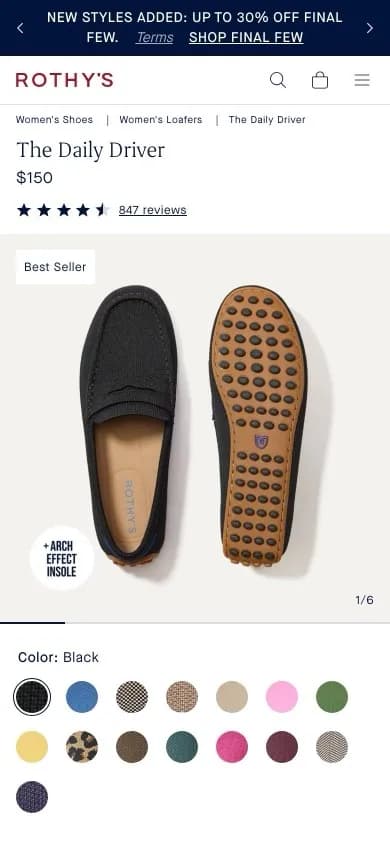 9:41rothys.com
16. Footwear
Rothy's
The Daily Driver
5 of 7 partsShows all 15 colors as swatches on the first screen, then a “Fits true to size” note right above the size buttons.
Swipeable photos
Option buttons
Detail dropdowns
Rating by the title
Size guide
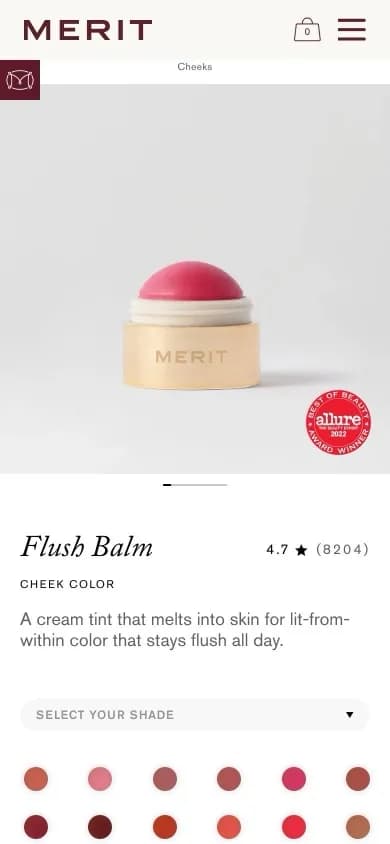 9:41meritbeauty.com
17. Makeup
MERIT
Flush Balm
4 of 7 partsShows every shade as a round swatch and lets shoppers pick a skin tone to see the shade on a matching model.
Swipeable photos
Option buttons
Detail dropdowns
Rating by the title
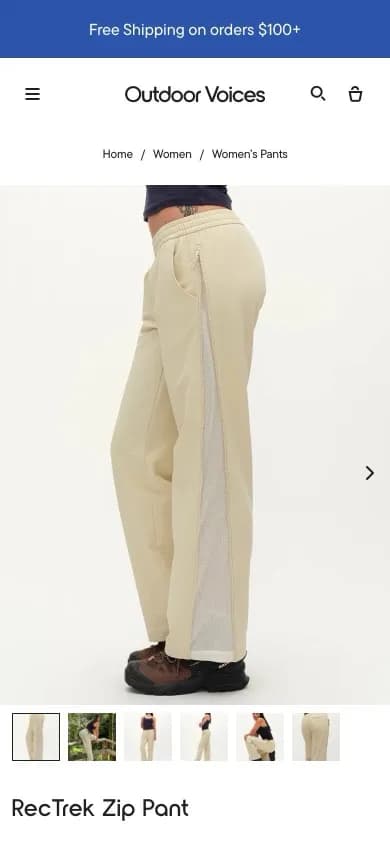 9:41outdoorvoices.com
18. Outdoor and fitness
Outdoor Voices
RecTrek Zip Pant
4 of 7 partsLeads with a full-width on-body photo and six thumbnails, so the most-tapped part of the page shows the fit.
Swipeable photos
Option buttons
Detail dropdowns
Size guide
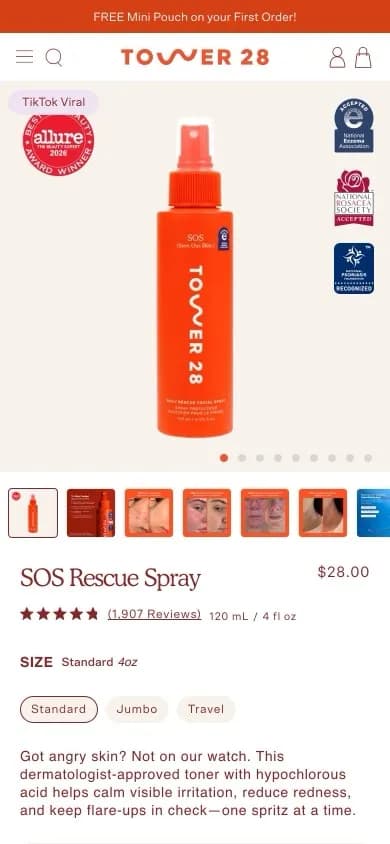 9:41tower28beauty.com
19. Makeup
Tower 28
SOS Rescue Spray
4 of 7 partsMixes before-and-after shots into the thumbnail strip, so the photos shoppers tap most also carry the proof.
Swipeable photos
Option buttons
Detail dropdowns
Rating by the title
 9:41zestypaws.com
20. Pet
Zesty Paws
Allergy & Immune Bites for Dogs
3 of 7 partsPuts the star rating above the title and a zoom on the main photo, with thumbnails that mix claims and dogs using it.
Swipeable photos
Detail dropdowns
Rating by the title
Each capture is the page's first screen on a 390 px phone and links to the live page. Ad landing pages by industry are in landing page examples.
See where your shoppers click
Every page Replo publishes gets a heatmap of clicks and scroll depth, by device.
 2.5mg
 5mg
 10mg


How we counted
- Click events on product pages of over 2,200 online stores that use Replo.
- Three samples of 40 minutes, at different hours across one week.
- Each click is grouped by the element's id, name, link or tag; others count as unnamed.
- A store counts on a device with 30 or more product page clicks in a sample.
- Shares are the average store, so one big store can't move them.
- Every element counted had clicks on 20 or more stores; no store or page is named.